



Compose your initial pack with a SnMap Chart area, including options at a preferential rate.
The basic pack includes ScanNav software with the GRIB (Weather) option, and a pack of SnMap charts of your choice.
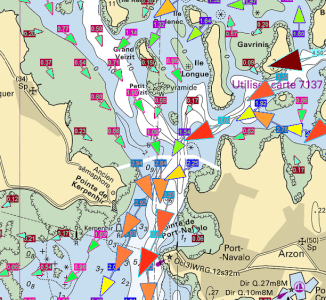
Currents option
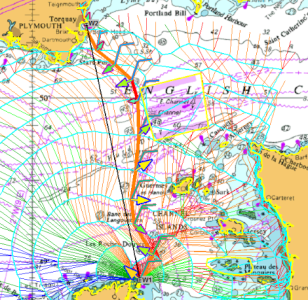
Performances option (Routing+Laylines+Polars)
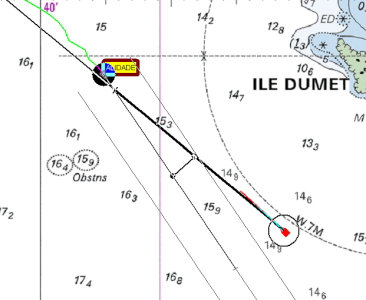
AIS option
Choose the SnMap zone to include in the pack
You already have compatible charts in your possession, or wish to add an optional module to your existing license.
Software updates are free for one year.
Subscribing to an update then allows you to benefit from software updates and support for one year, as well as the possibility to change a PC.
The price depends on the date of your last update.
The SHOM UJA current zones give you access to very high definition currents on the French coasts, and the UKHO zone on England.
- The desired offer (Vector or Raster Charts),
- If this is an initial purchase or an update.
In case charts are intended to be used on software other than ScanNav, please specify it in the comments of the order.
- The desired offer (Navionics + or Platinum +),
- Coverage among large areas (Large) and more localized maps (Regular).


)
)
)
)
)
)
)
)
)
)
)
)
)
)
)
)
)
)
)
)
)
)
)
)
)
)
)
)
)
)
)
)
)
)
)
)
)
)
)
)
)
)
)
)
)
)
)
)
)
)
)
)
)
)
)
)
)
)
)
)
)
)
)
)
)
)
)
)
)
)
)
)
)
)
)
)
)
)
)
)
Official ENCs are sold per chart on quotation.
To order, choose the desired cells interactively from Primar's online catalog, then save the basket and send us the resulting file by email. The Primar catalog also allows you to send it directly. Just make sure to choose "ScanNav" from the list of distributors.
You can also write down the cells you want from the Primar catalog or the IHO catalog, and send us the list by email. If you have a doubt about your selection, do not hesitate to contact us, we will assist you in selecting the cells best suited to your needs.
In general, remember to select only the cells that you really need. If you have any gaps later, you can order an add-in at any time and download it.
In all cases, we will send you a quote as soon as possible.
The price of ENCs includes a subscription(1) for weekly updates ranging from 3 months to a year(2). Pricing differs from country to country, and is subject to variation. Please contact us for an exact quote.
-
(1) At the end of the subscription, the cells can no longer be updated, and they no longer meet the SOLAS requirements
(2) Some countries (Singapore, Japan and Malacca) only offer the 12 months subscription
(*) There is normally a minimum order of 100€ for the first order, although a tolerance may be accepted.
This section is reserved for custom orders. Please contact us before use. You must enter the total amount (VAT including) communicated in the quote.